

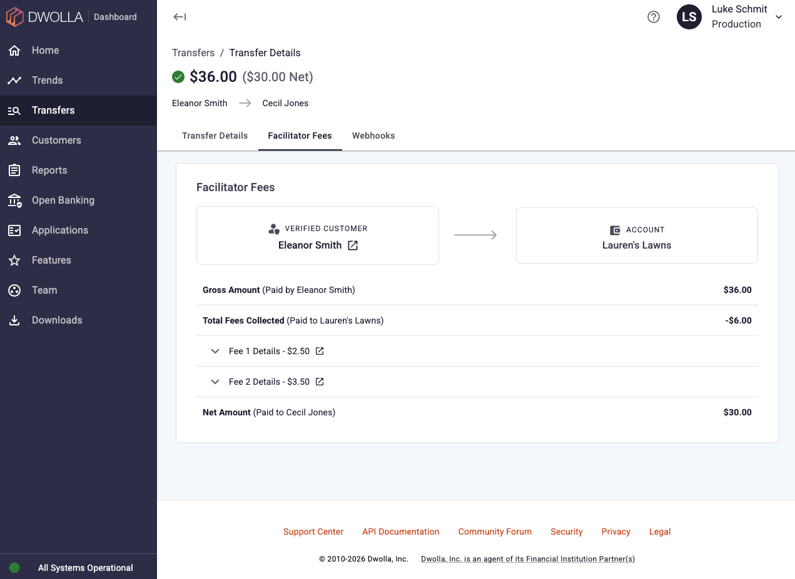
The Transfer Details page now features a dedicated Facilitator Fees tab, designed to bring clarity to complex funds flows by providing a clear breakdown of exactly how fees impact your transfers.
Visibility into Complex Fee Structures
Facilitator fees add complexity to funds flows in multiple ways.
- Fees can be charged to the source or the destination.
- A single transfer can include multiple fees.
- Depending on the customer types involved, fees might get pulled at different points in the flow.
Instead of unraveling that yourself, the new Facilitator Fees tab does the math for you and shows you exactly how much money moved and where the fees landed. Each fee item is expandable, so you can drill into the amount, status, Transfer ID and created date without leaving the page.
Additionally, the page header now reflects if a fee is associated with the originating transfer. It displays both the Gross Amount and the Net Amount, making it immediately clear if fees were involved.
How This Helps You
-
Reduced Guesswork: Instantly see the math behind gross and net amounts.
-
Centralized Details: View fee Transfer IDs, statuses and dates via expandable rows without navigating away.
-
Visual Clarity: Understand the movement of funds between sources, destinations and facilitator accounts at a glance.
-
Instant Context: Use the updated header to identify fee-impacted transfers the moment the page loads.
These updates are live in your Dashboard now. Sign in to the Dwolla Dashboard, navigate to the Transfers section and select a specific transfer from the list. If the fly-out header displays a Gross and Net amount, a fee was involved in that transfer. View the details of that Transfer and then select the Facilitator Fees tab to see the full breakdown.
If you have any questions or need assistance, please email support@dwolla.com.