

Transfer Details Page & Facilitator Fees Tab
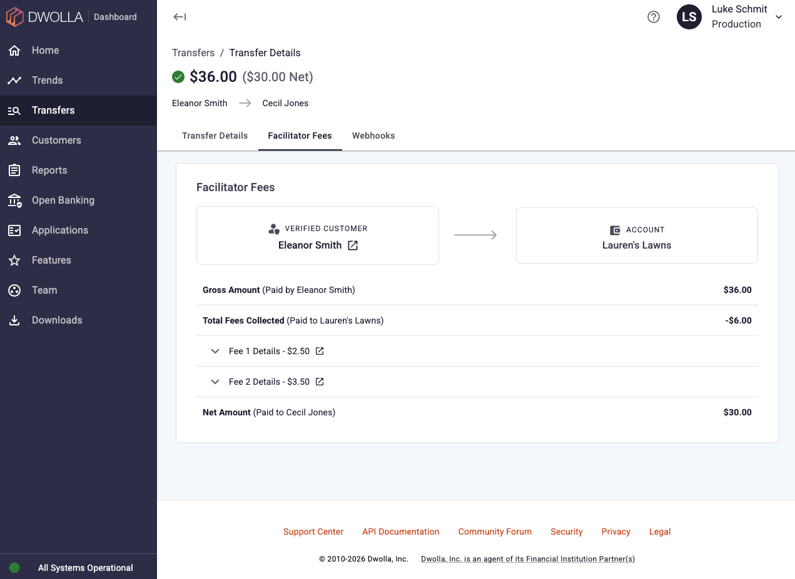
Facilitator fees can add complexity to a transfer's funds flow. Fees can be charged to the source or the destination, a single transfer can carry multiple fees, and depending on the customer types involved, fees may be pulled at different points in the flow. You no longer have to reconstruct that flow manually.
The Transfer Details page now includes a dedicated Facilitator Fees tab that surfaces this information clearly:
- Gross and net amounts are displayed in the page header, so you can see at a glance whether fees were involved in a transfer.
- A full fee breakdown shows exactly how much money moved and where fees landed.
- Expandable fee rows let you drill into each fee's amount, status, Transfer ID and created date without leaving the page.
We've also refreshed the design of the transfer details page and flyout to make this information easier to navigate. Clearer tab-style leg selection ties details more directly to the leg you're viewing, the layout stays anchored as you move through it, and the orchestration overview now includes customer and funding source type icons for faster scanning.
New Developers Section
We've refreshed how you manage your developer resources in the Dashboard. The Developers section (formerly labeled Applications) brings your applications list, webhook subscriptions, IP allow list and webhook subscription details into one consolidated, more intuitive area. Webhooks and IP allow lists in particular are now easier to find, so you spend less time hunting for the settings you need and more time building.
Dynamic Features Page
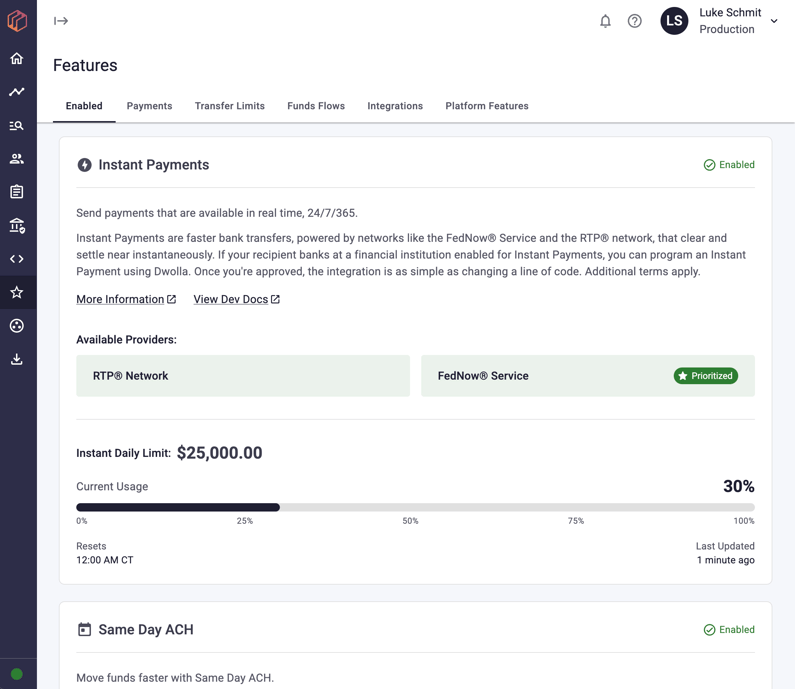
The Features page in your Dashboard has moved from a static list to a dynamic view that reflects your specific setup. You can now:
- Check feature status: See what's currently enabled or disabled at a glance.
- Monitor instant payment usage: If you have Instant Payments enabled, track your daily usage against your limit so you know when you're approaching it.
- View transfer limits: Reference your limits, including separate limits for verified and unverified customers.
Contact Info Page
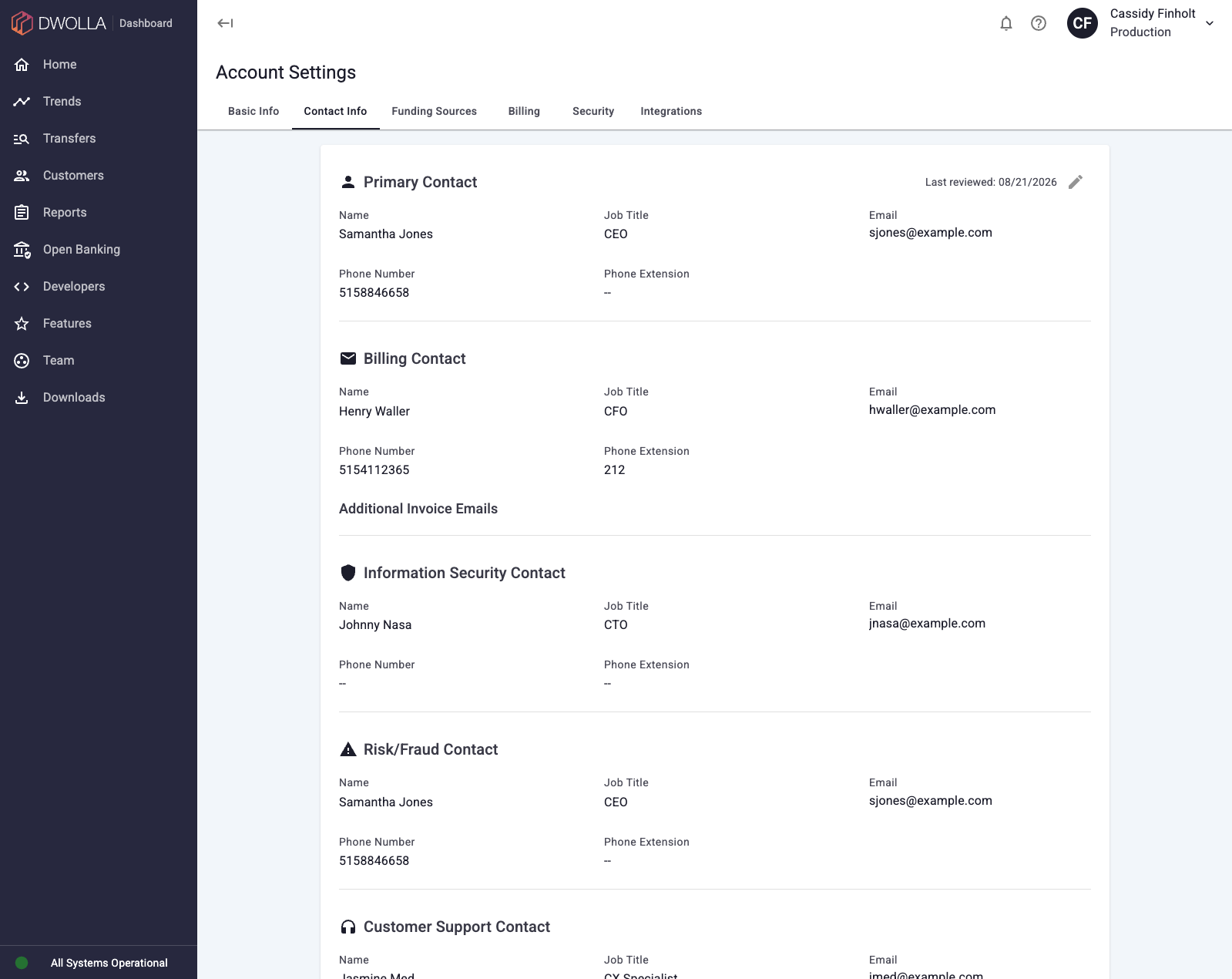
The new Contact Info page, found under Account Settings, lets you provide direct contact details for the people who matter most at your organization, including your Primary Contact, Billing Contact, Information Security Contact, Risk/Fraud Contact and Customer Support Contact. With accurate contacts on file, critical or time-sensitive information reaches the right person the first time, cutting down on back-and-forth and helping us support your business more effectively.
(Note: Viewing this page requires the Account Read permission; submitting or editing it requires Account Write.)
MassPay Metadata
MassPay metadata was previously only accessible through the API, meaning you either had to build your own internal tooling or contact our team to get it. That data is now visible directly in the Dwolla Dashboard on the MassPay Details page for both the main account or for a customer record, available for self-service anytime you need it.
Team Page & Team Member Details Page
We've moved permission editing out of a cluttered flyout and into its own dedicated page. Alongside this, a new Team Member Details page lets you check any team member's permissions at a glance, without having to navigate to the edit view.
1099-K Report
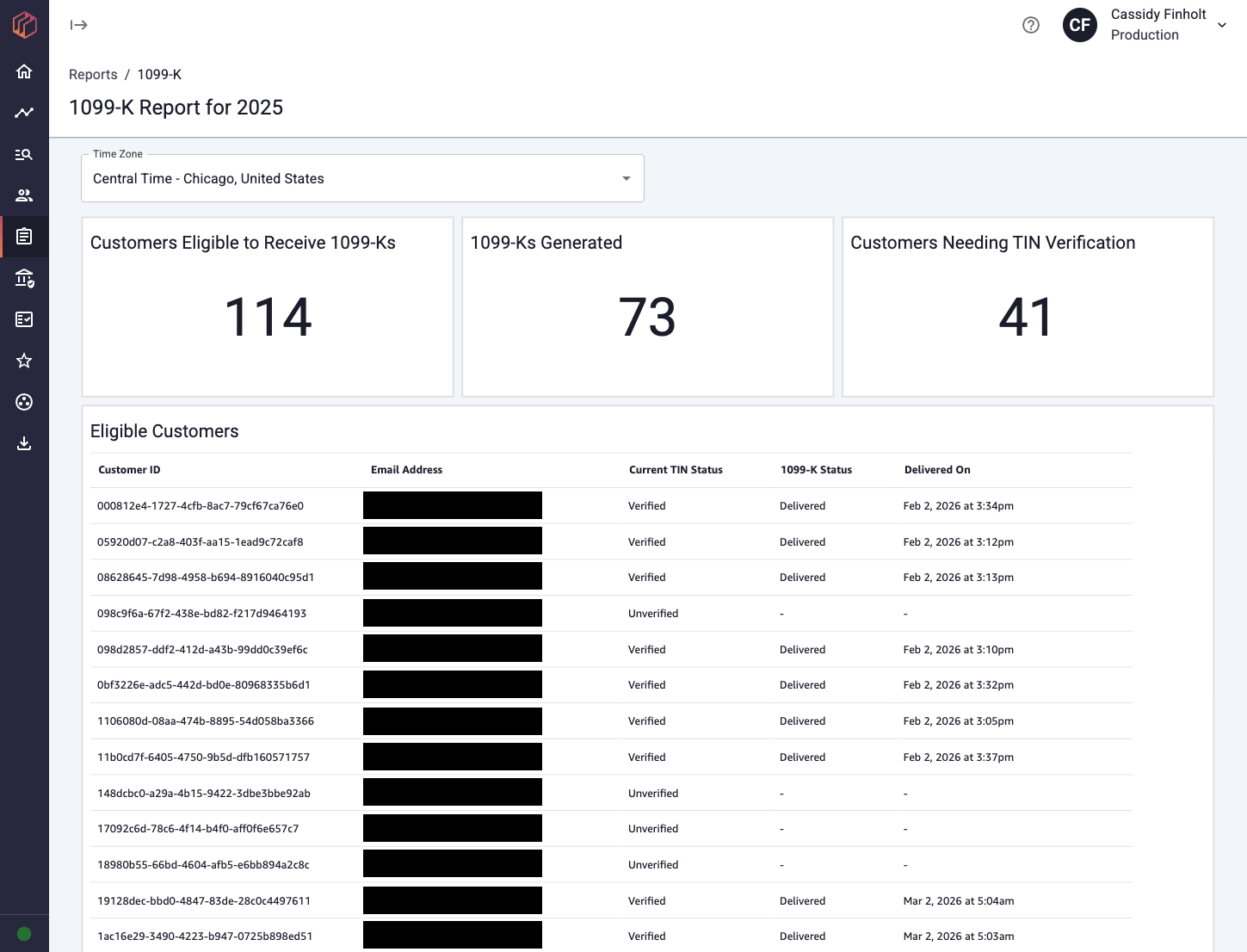
You can now access end user 1099-K data directly in the Dwolla Dashboard. Previously, getting this information required submitting a support request and waiting for our team to manually compile the data. The new 1099-K Report gives you on-demand visibility into which of your end users are eligible to receive a 1099-K, along with each user's current TIN verification status, anytime you need it, directly in your account.
Other Dashboard Improvements
- Session handling fix: Fixed redirect behavior when a session expires across multiple open browser tabs.
- Billing page update: Your billing page now displays the account and routing number (AN/RN) for a billing source, consistent with how other funding sources are shown across your dashboard.
- Send Funds modal: Updated the ordering and labeling of funding sources in the Send Funds modal based on client feedback, making it quicker to pick the right source when sending a transfer.
- Webhook fixes: Resolved a set of client-reported webhook issues. Webhook attempts in your Dashboard now order by date for easier scanning, and webhook statuses refetch automatically so you're not left looking at stale values.
Balance
Instant Payment Eligibility Webhooks
Dwolla by NMI previously only sent instant payment eligibility webhooks when a funding source was first created, or when a manual update triggered an eligibility change. Since bank support for the FedNow® Service and RTP® network is dynamic, banks can begin or cease support at any time, and your system had no way to learn about those changes automatically.
Dwolla by NMI now fires customer_funding_source_rtp_enabled and customer_funding_source_rtp_disabled webhooks whenever a funding source's eligibility changes, including during Dwolla by NMI's daily eligibility update process. This keeps your system in sync with the latest eligibility information as soon as we receive it.
Push to Card (Beta)
Dwolla by NMI's Push to Card capability will expand your instant payout options beyond bank rails. Push to Card lets you send funds lets you send funds in near-real time to eligible U.S. debit cards using the same Dwolla by NMI integration you rely on for ACH and instant bank payments. We're currently in beta with select clients and preparing for broader availability. If you want to be among the first to go live, join the waitlist to be considered for early access once the beta period ends.
Facilitator Fees on Instant Payment
Instant payment rails now support facilitator fees. If you monetize your platform at the transaction level, you can charge a facilitator fee to either the sender or the receiver on instant payments (the RTP network and the FedNow Service), just like you already can on ACH transfers. Facilitator fees exist as a separate Transfer resource, so they don't affect the original payment amount and are simple to track independently.
Platform Security Updates
As fraud tactics grow more sophisticated, Dwolla by NMI has shipped two platform security enhancements this quarter to strengthen network integrity and reduce risk for your platform and your end users. No action is required on your end to enable these updates.
- Enhanced Identity Verification Logic: Previously, certain users with mismatched identity signals could begin transacting before a manual review was completed. Dwolla by NMI now automatically holds these accounts for review before they can transact, adding a review step earlier in the onboarding process. This reinforces a more secure environment for all network participants.
- Automated Registration Defenses: Dwolla by NMI now cross-references new registrations against known fraudulent patterns and identity-masking techniques. Accounts matching these profiles are suspended at the infrastructure level, blocking access before platform onboarding.
A note on platform oversight: These enhancements add additional controls at the infrastructure level, but they are not a substitute for platform-level monitoring. Your platform remains the primary point of contact with your users and is responsible for overseeing signups and transactions. We recommend pairing these updates with your own identity and fraud monitoring protocols for comprehensive coverage.
Developer Tools
New CLI Tool (Beta Release)
We're excited to introduce the beta release of dwolla_cli, a new command-line tool for exploring the Dwolla by NMI API, seeding sandbox data and automating testing workflows without leaving your terminal. Every API resource maps to a command, and the CLI defaults to the sandbox so you can experiment safely.
Beyond raw API access, the CLI ships with tooling built for testing: workflows run complete multi-step sandbox scenarios with a single command, trigger fires real sandbox webhook events for you to test against, and listen opens a public tunnel to forward verified webhooks to your local app. It also detects when it's running inside an AI coding agent (like Claude Code, Cursor or Codex) and switches to a token-efficient agent mode automatically.
View it on GitHub for installation and examples, and share feedback on usability, bugs, and feature requests at developers@dwolla.com.
Developer Portal Redesign
The Dwolla by NMI Developer Portal has a new look designed to get you to working code faster. The redesigned homepage features clearer entry points into Guides, the API Reference and SDKs, while the refreshed docs landing page adds quick-start cards, a searchable hero and a full content index. We've also introduced a new Quickstart guide and tidied up navigation throughout, alongside an updated visual design with light and dark modes.